Setup Notes III - full do-over
Suggestion summary
Maintain in one place in Setup Notes I
SAM CLI
- Amazon: Prerequisites for SAM CLI
- Amazon: Installing the SAM CLI
- (Optional) Amazon: Hello World Serverless App
Prerequisites: Start from zero
I'm going to start from scratch again to keep simulating the beginner experience.
- Step 1: Sign up for an AWS account
- Step 2: Create an IAM user account
- Step 3: Create an access key ID and secret access key
- Step 4: Install the AWS CLI
- Step 5: Use the AWS CLI to configure AWS credentials
Step 1: Sign up for an AWS account
I'll create another new AWS account for my Manning-related work.
I closed all my open Ingognito windows and opened a fresh Incognito window, then I went to https://portal.aws.amazon.com/billing/signup
- email:
sbonds+manning-aws-2@gmail.com(use a gmail alias to help this account stand out) - AWS account name
sbonds-manning-2
Complete the email verification and remaining sign-up
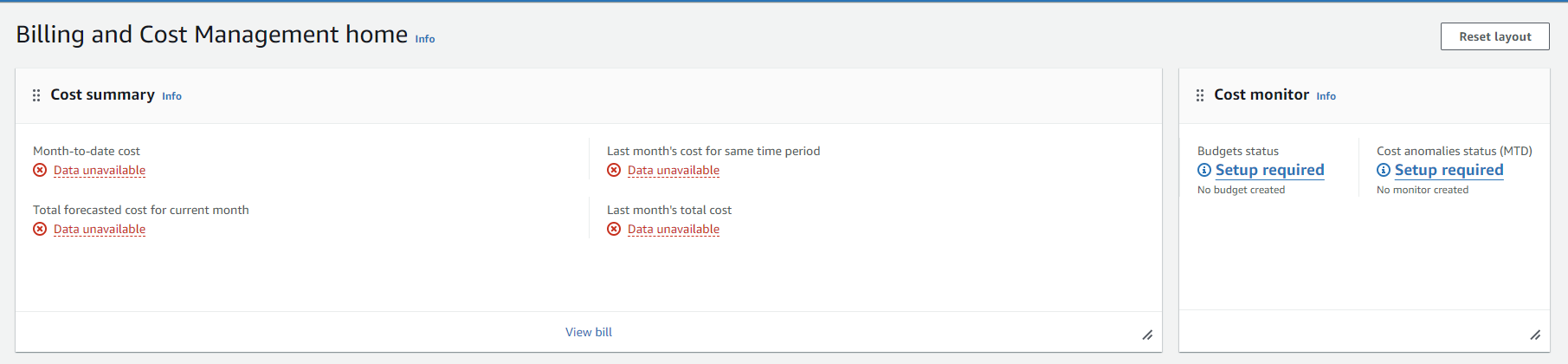
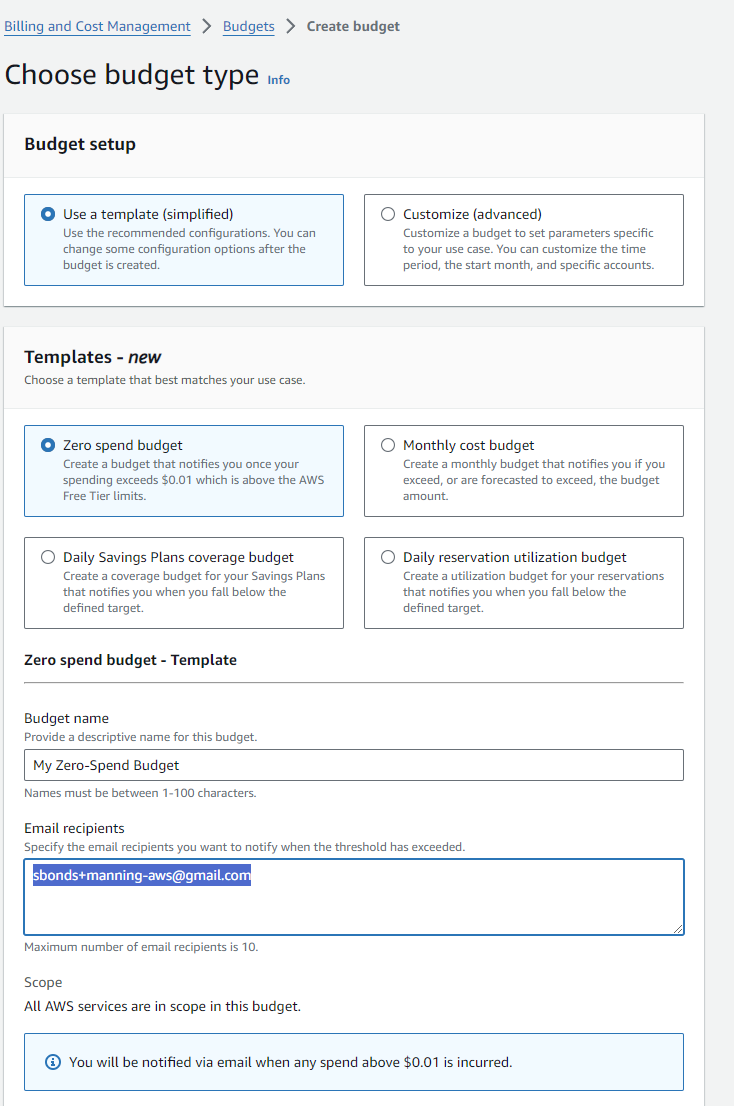
Create a budget - same as before
This isn't mentioned, but any time I'm paying cloud costs personally, I like to know before I get a gigantic bill.
Hey, they have a template for zero spending, nice!
Step 2: Create an IAM user account
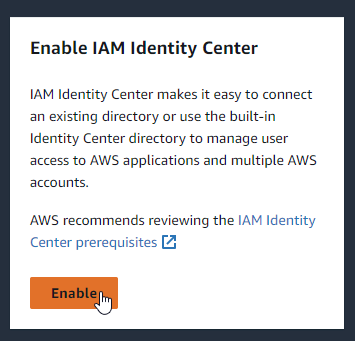
Install IAM Identity Center
Evaluate: IAM Identity Center (recommented by AWS)
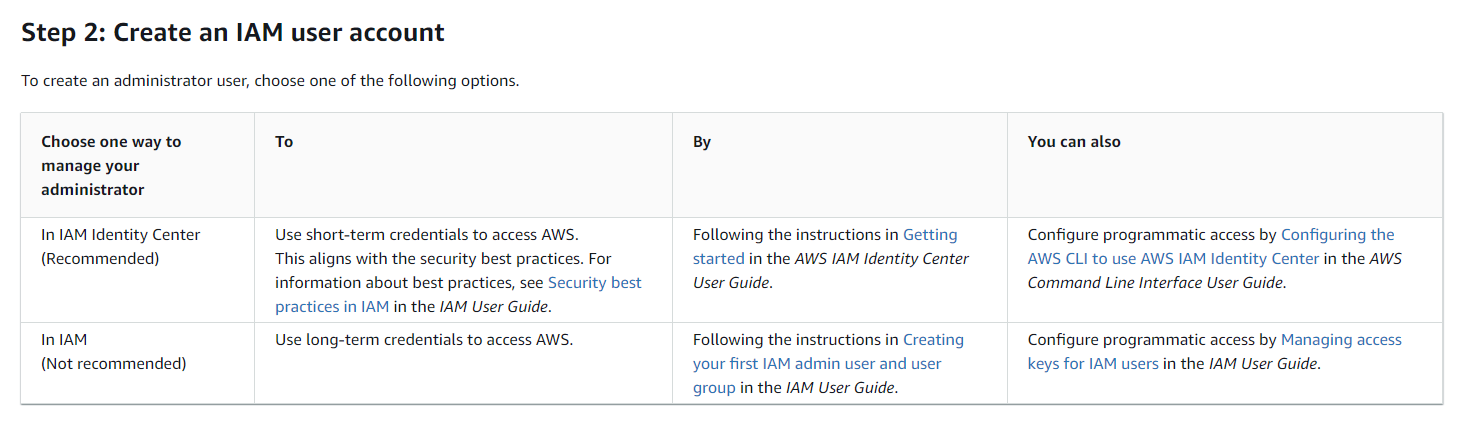
Basic info:
This looks like several layers of extra complexity which won't be necessary for a single-human-user test environment like I'm building here.
Follow this process: Amazon: Create an admin user
Seems like a good plan.
Go to https://console.aws.amazon.com/singlesignon in my AWS root user Incognito session.
Check the important question-- how much does this cost? From https://aws.amazon.com/iam/identity-center/faqs/:

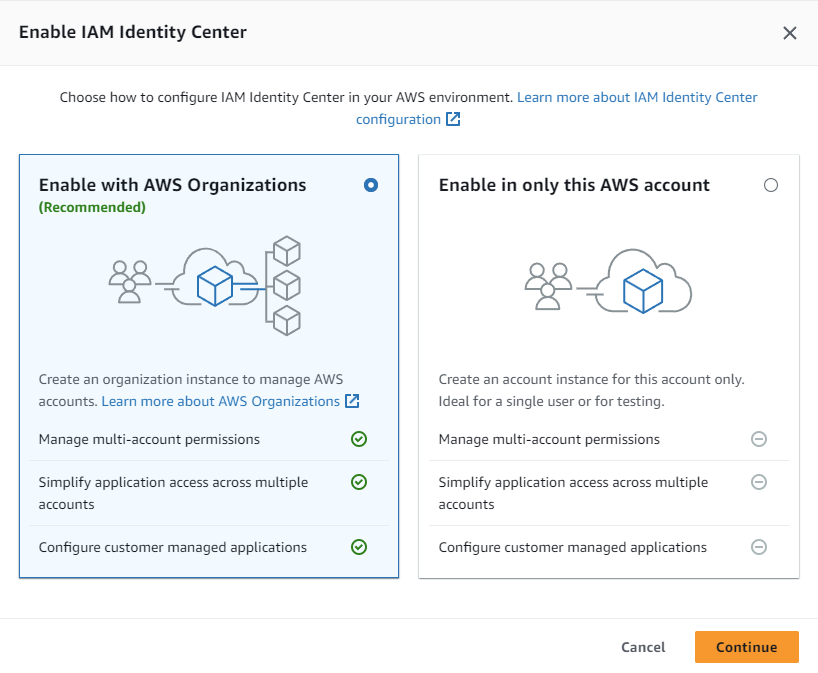
Enable it:
Config choice AWS org or AWS account
It looks like creating a dedicated user for SAM requires an AWS org and not an AWS account, so my time-saving choice from last time ended up costing me time. However, I learned something new, so that's always nice.
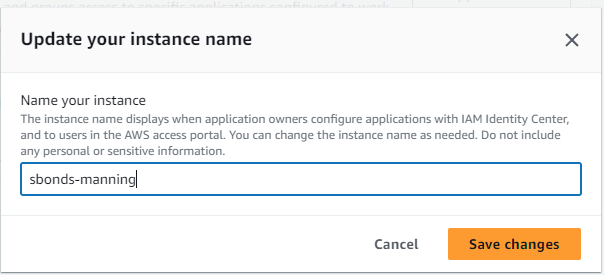
Change my instance name to "sbonds-manning-2":
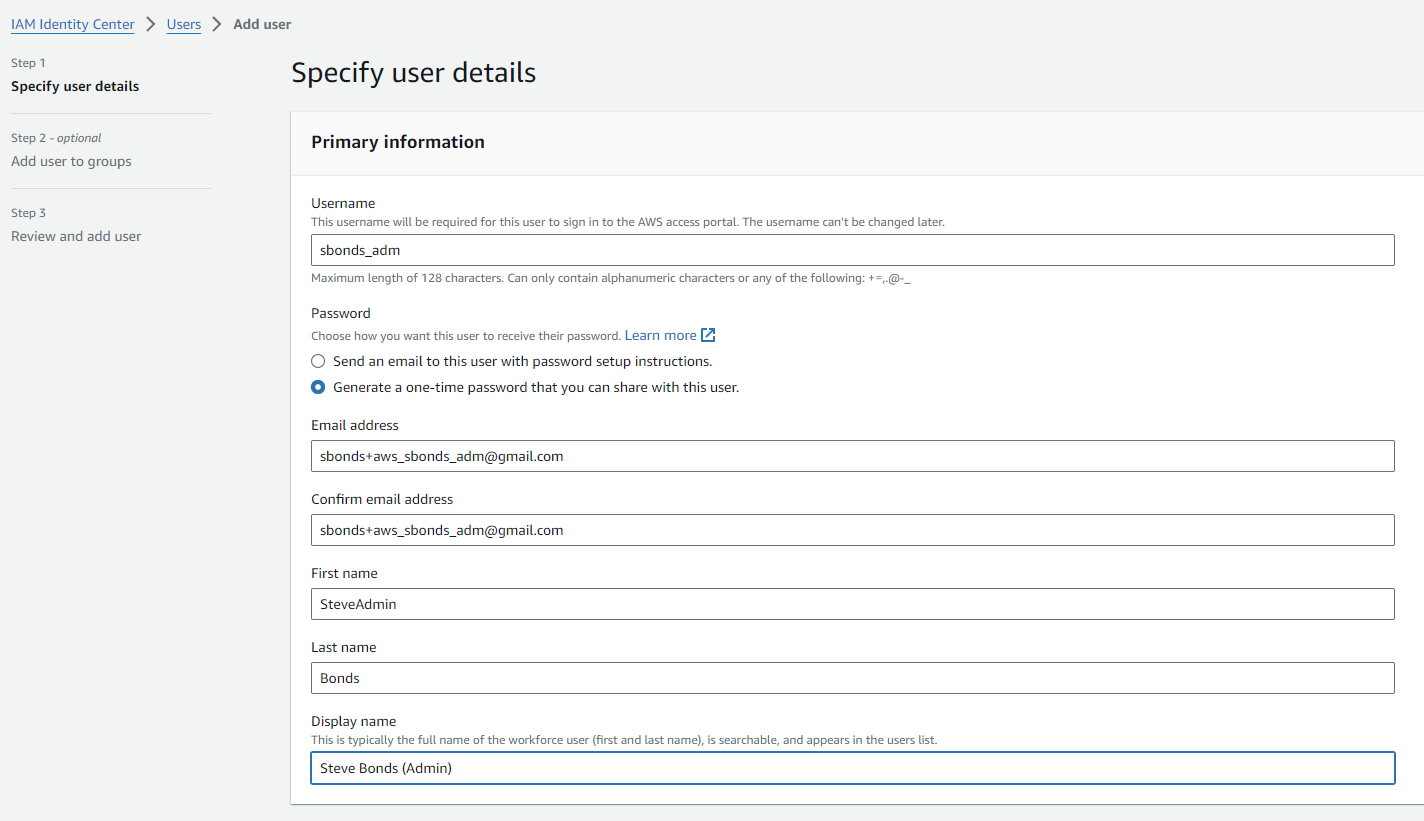
Create user who will be an administrative user
- Username: "sbonds_adm"
- Email. address: "sbonds+aws_sbonds_adm@gmail.com"
- First Name: SteveAdmin
- Last Name: Bonds
- Display Name: Steve Bonds (Admin)
 https://d-9a6775d6b9.awsapps.com/start
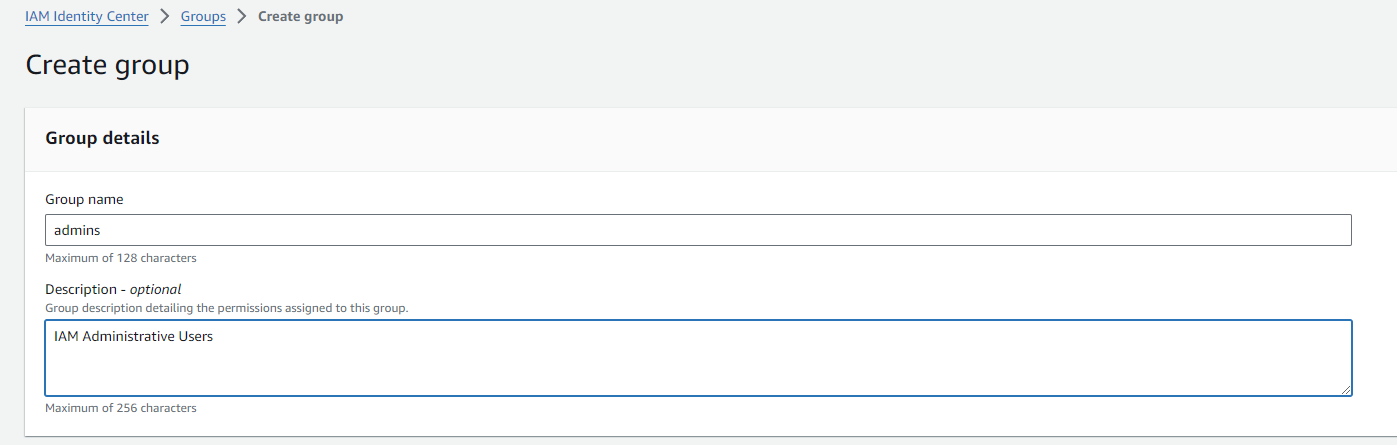
Create group of admins, because why not:
https://d-9a6775d6b9.awsapps.com/start
Create group of admins, because why not:
Go to my user creation tab and add the user to admins group after using the on-page refresh:
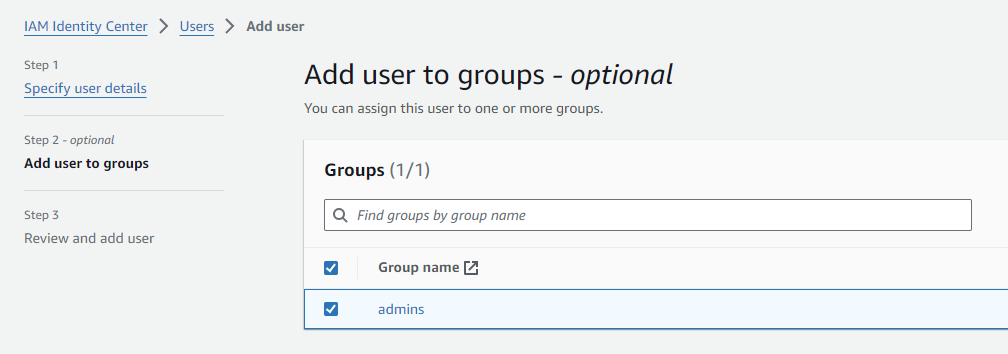
Change the group to be an administrative group
From https://docs.aws.amazon.com/singlesignon/latest/userguide/quick-start-default-idc.html this step doesn't match what I see:
In the IAM Identity Center navigation pane, under Multi-account permissions, choose AWS accounts.
Hey, this exists now! Progress!
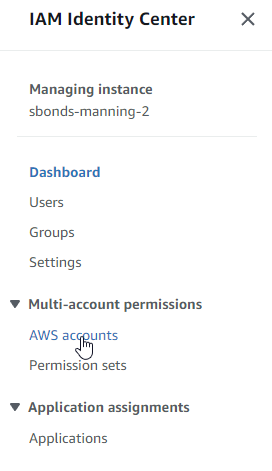
The instructions make much more sense when I'm using the correct implied prerequisite. Choose my management account:
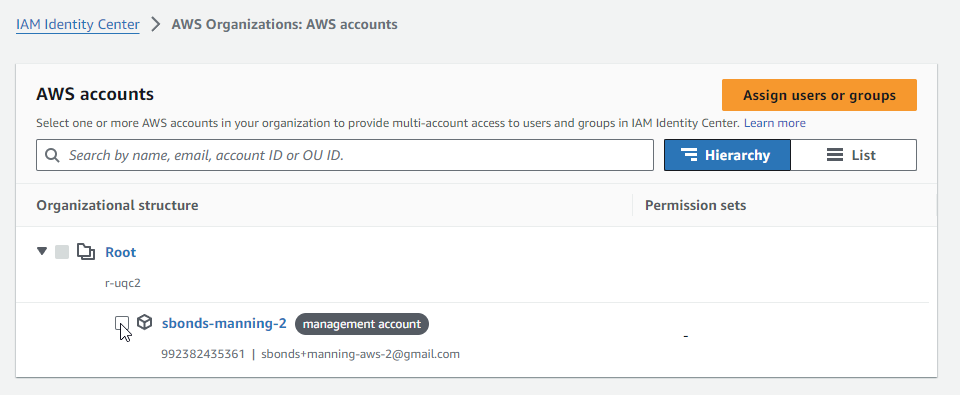
The workflow didn't appear when I checked the box-- I needed to hit "Assign users or groups".
Choose the admin group:
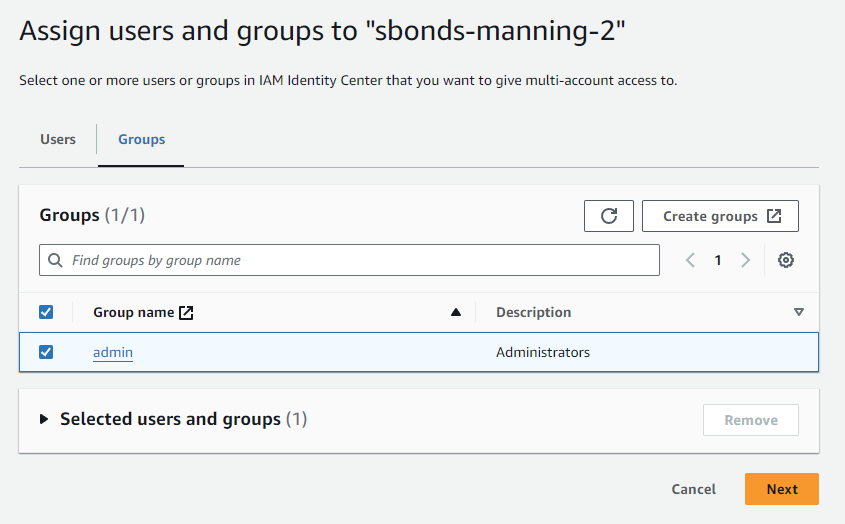
As described in the Configure user access with the default IAM Identity Center directory doc, there are no permission sets so I need to make one:
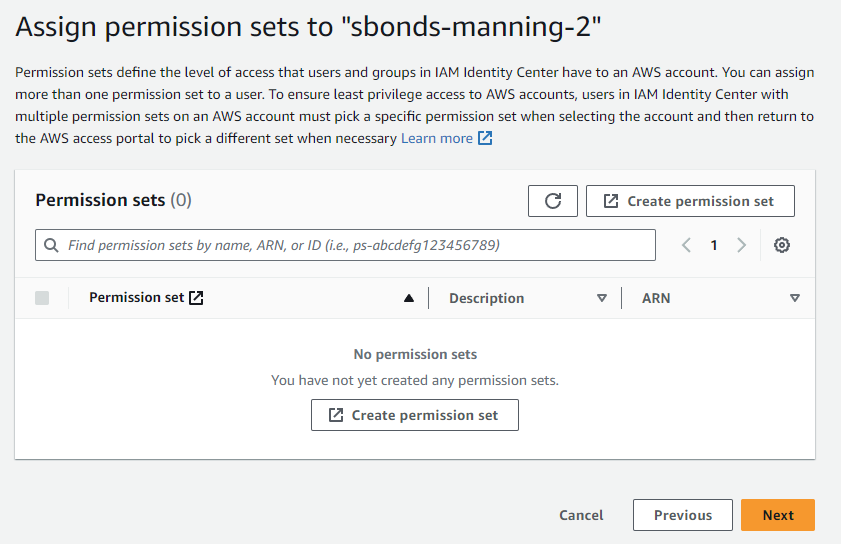
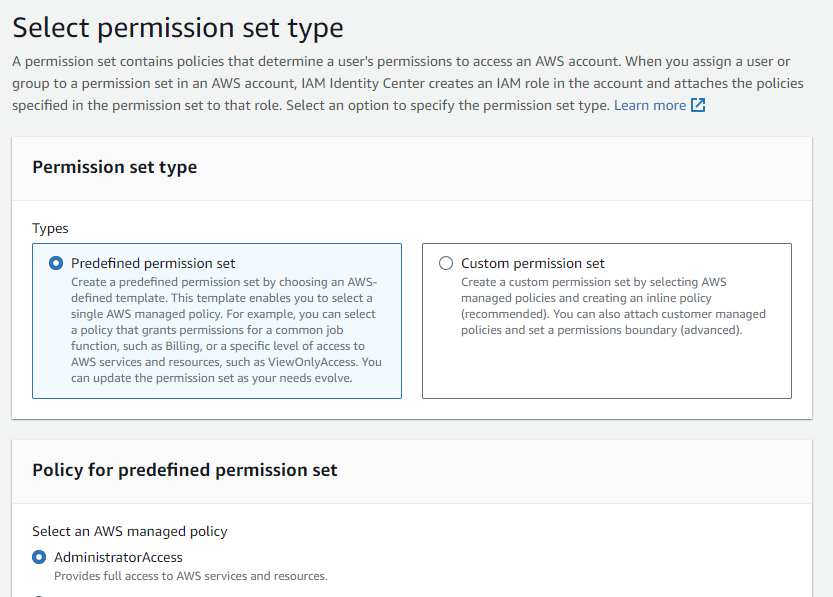
Use predefined/administrator:
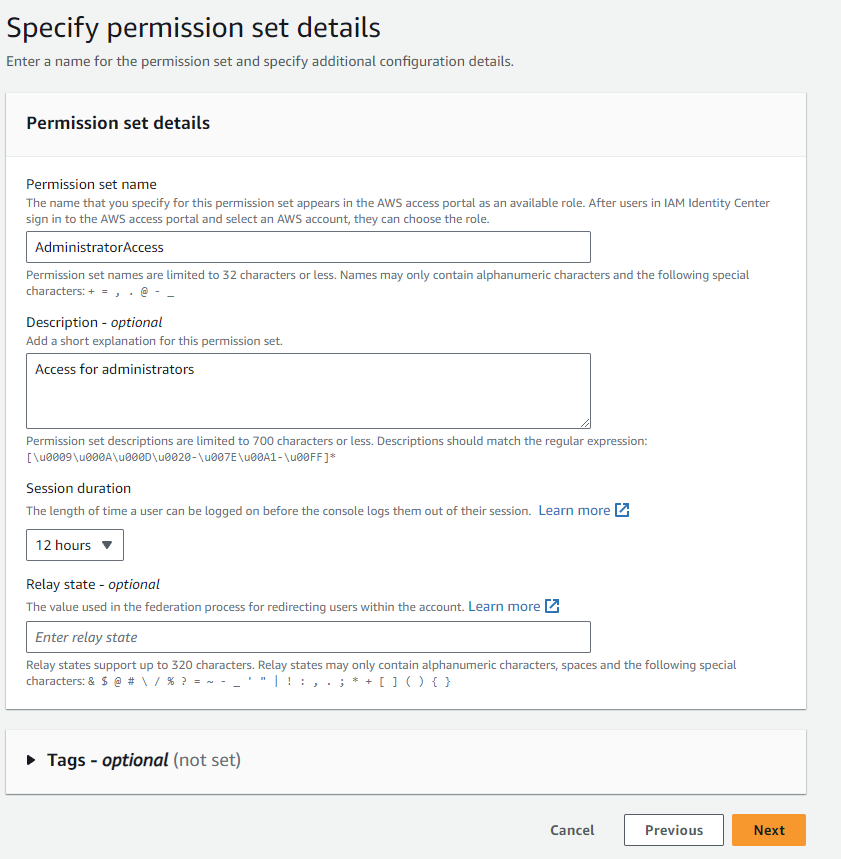
The default name is fine, but I'm extending the session duration to 12h to be extremely convenient for a single long workday.
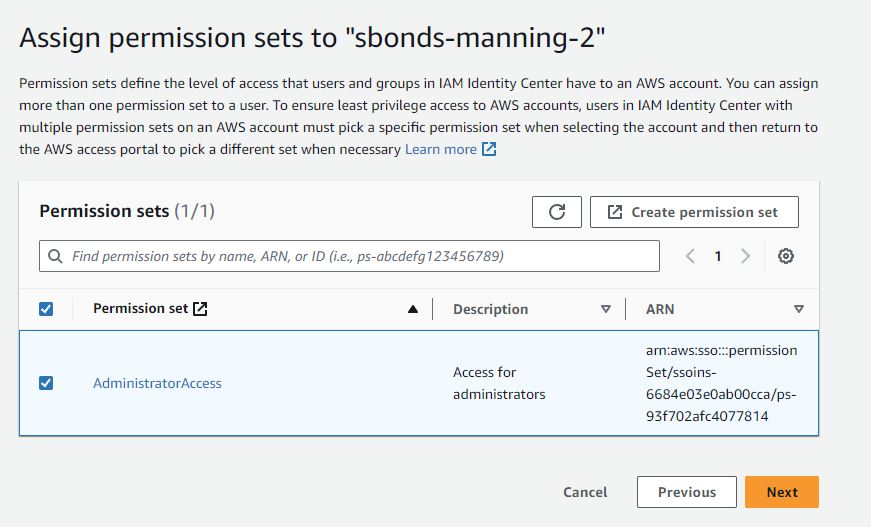
Once completed, refresh my original tab and assign the admin group to this new permission set:
Test IAM admin account
No longer a blank portal:
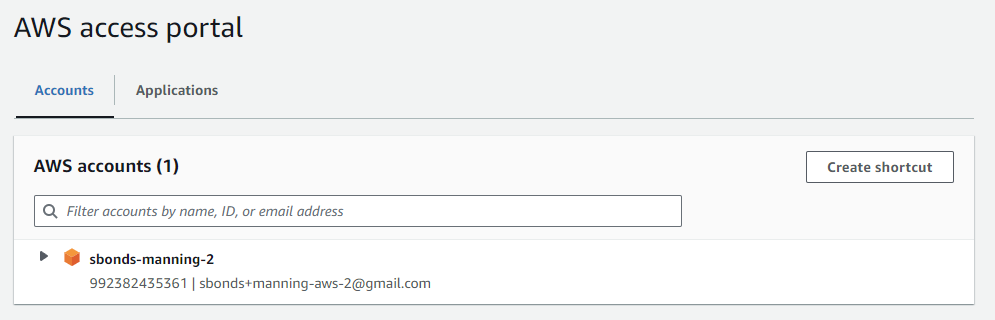
Can see the AWS Org I just created:
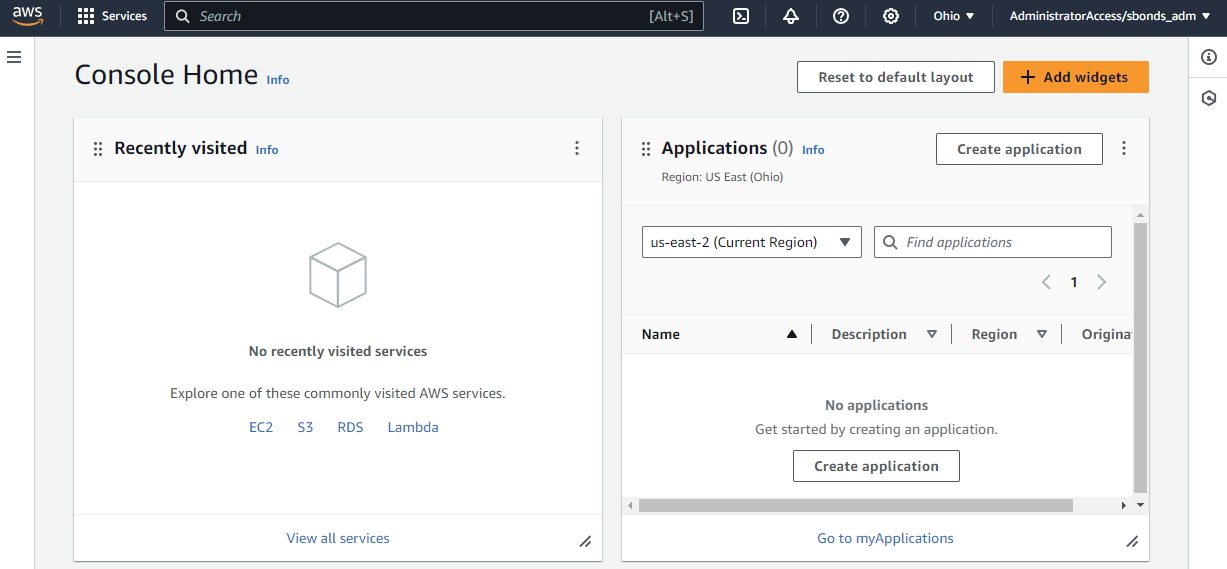
Step 3: Create an access key ID and secret access key (deferred)
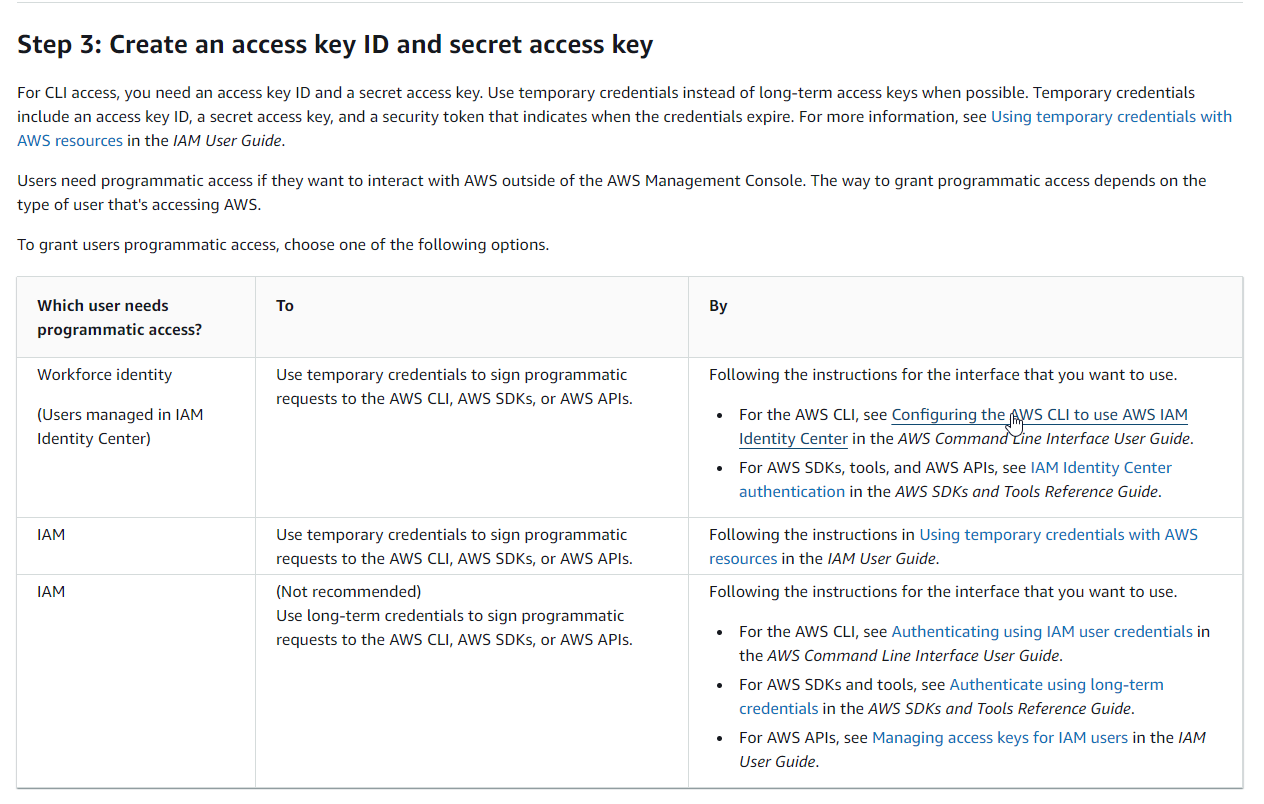
AWS SAM is a CLI but not the same as AWS CLI. Seems like this doc could have been clearer since it's specific to AWS SAM. I'll assume we're following the AWS CLI path for a Workforce Identity for now.
Turns out configuring the recommended SSO option requires the AWS CLI, so install that first and defer this step
Install AWS CLI
I thought about isolating this work with Docker or a Linux VM or similar, but since all the actual program code gets executed remotely, I'm not going to worry about it. I'm installing the AWS client on my local Windows system.
aws --version
Step 3: Create an access key ID and secret access key (resumed)
Explore the SSO Token provider to see what options there are for Amazon-provided SSO:
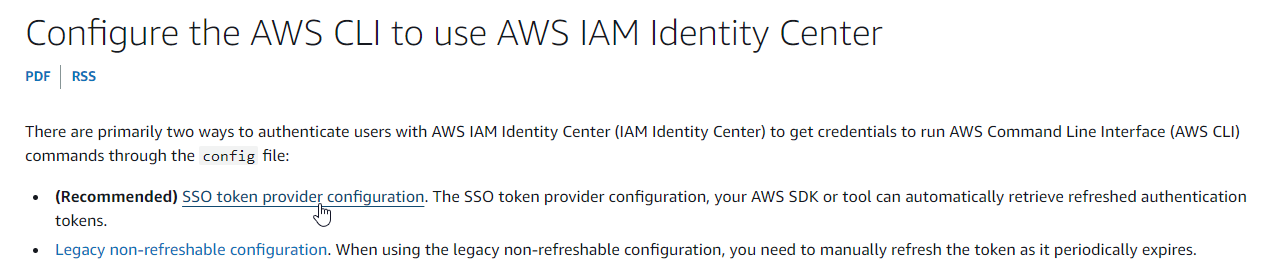
Where do I find the info for the CLI?
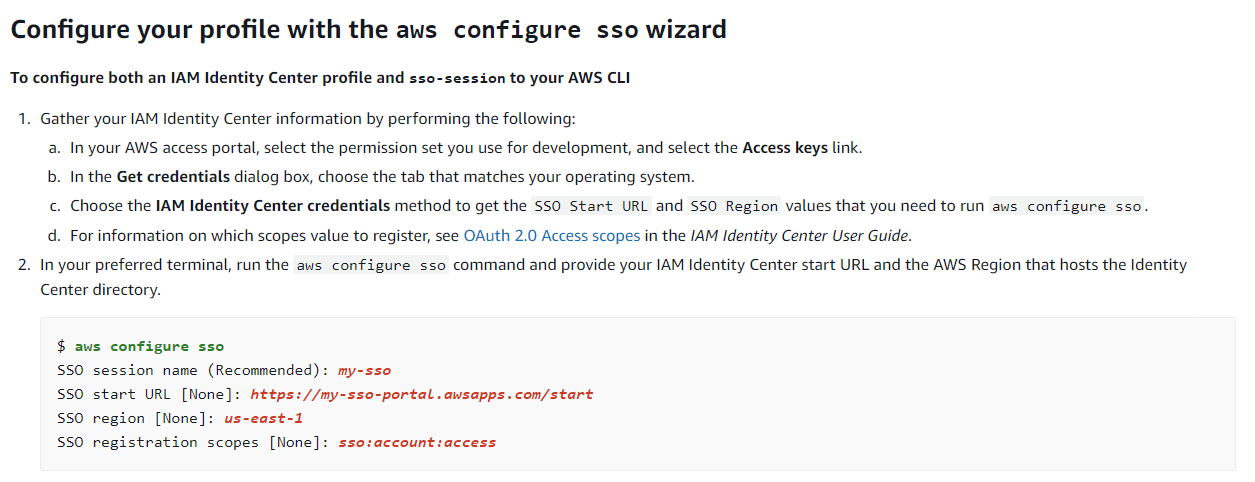
I'm not the only one needing this info:
StackOverflow: Where to Obtain the SSO start URL?
The existing answer of "It's under 'Command line or programmatic access'" no longer applies.
I found it after the intitial login, but before continuing to "sbonds-manning-2":
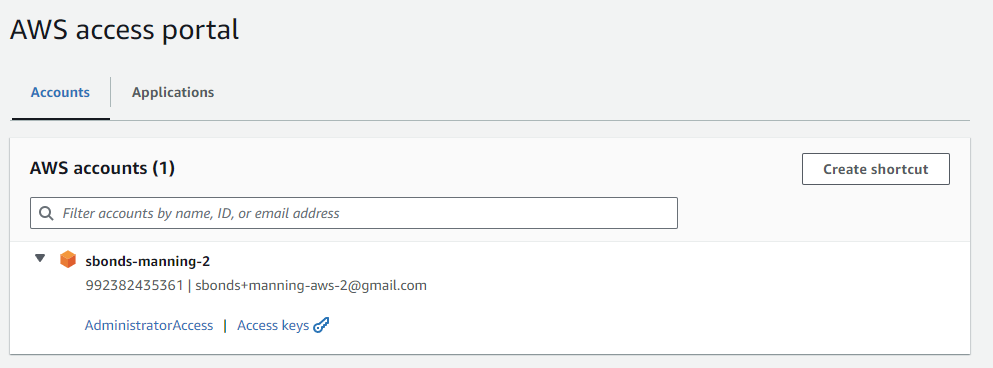
The "Access Keys" link has the info:
Lots of private info below this section of the same page for AWS_ACCESS_KEY_ID, etc.
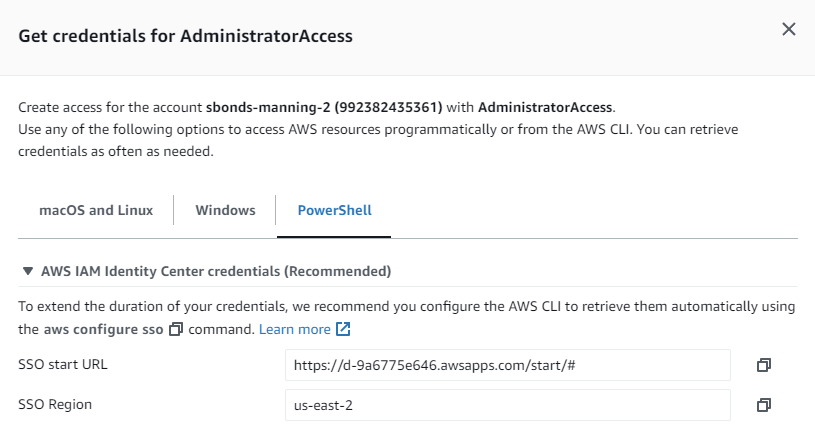
For the session name, I just made up a name. The SSO registration scopes info link here:

No longer goes to relevant content and rolls up to the generic What is IAM Identity center. So that's not great.
Found a useful doc via search at Customer Managed Applications / SAML 2.0 and OAuth 2.0:
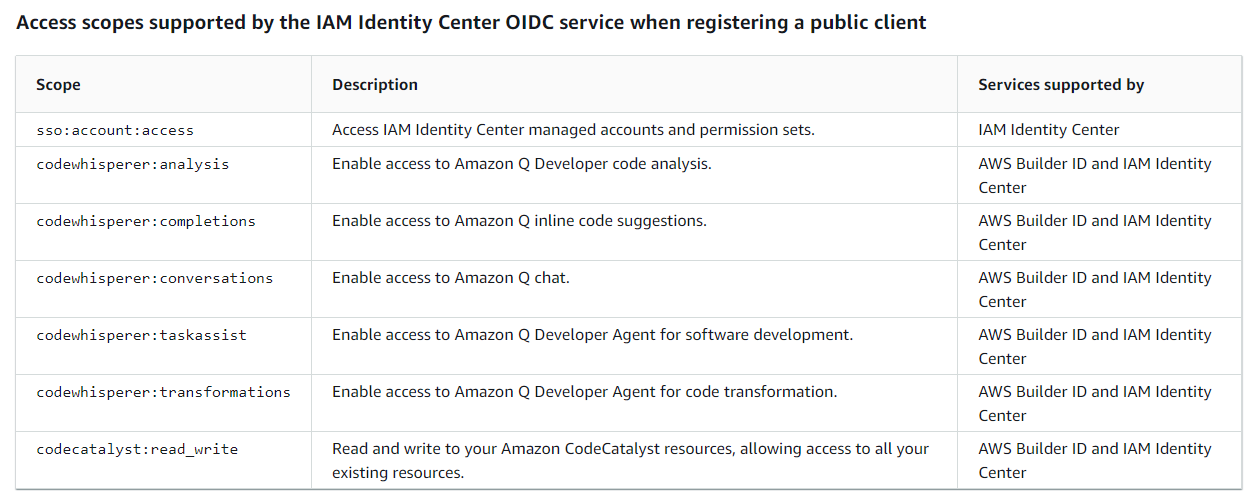
Looks like the example can be used verbatim as sso:account:access.
- SSO session name:
sbonds-manning-2-sso - SSO Start URL:
https://d-9a6775e646.awsapps.com/start/# - SSO Region:
us-east-2 - SSO registration scopes:
sso:account:access
Inspect the aws configure sso help output to identify useful command line options.
Copy the URL to my Incognito session where I'm logged in with sbonds_admin. Eventually I get this prompt:
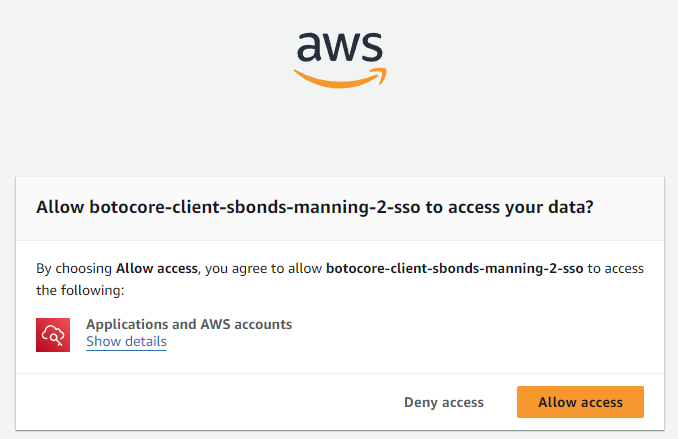
More info requested:
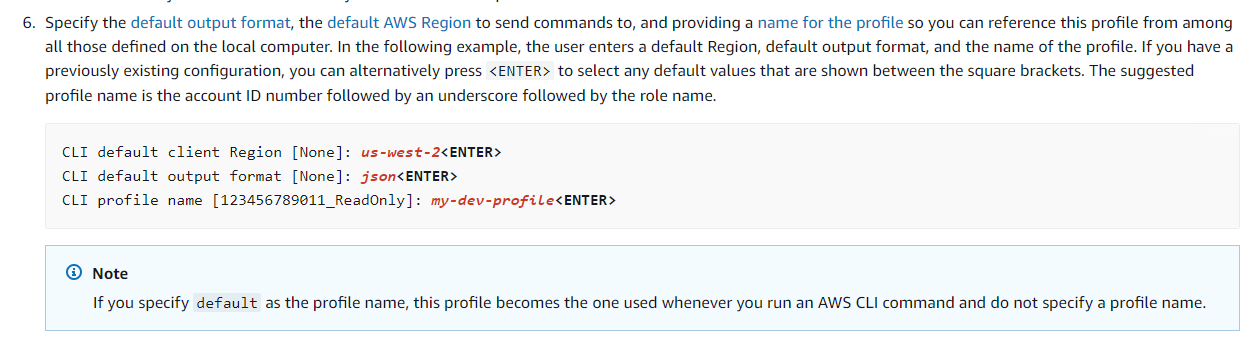
- CLI default client region:
us-west-2 - CLI default output format:
json - CLI profile name: (not prompted, used sbonds-manning-2)
Output:
To use this profile, specify the profile name using --profile, as shown:

aws s3 ls --profile sbonds-manning-2
Time check: Step 3 completed in 2.5 hours
Wow, that was step 3 of 5 completed. Time check: 2.5 hours since starting this re-do.
Step 4: Install the AWS CLI
Easiest step ever! This was necessary for Step 3 and is already done.
Step 5: Use the AWS CLI to configure AWS credentials
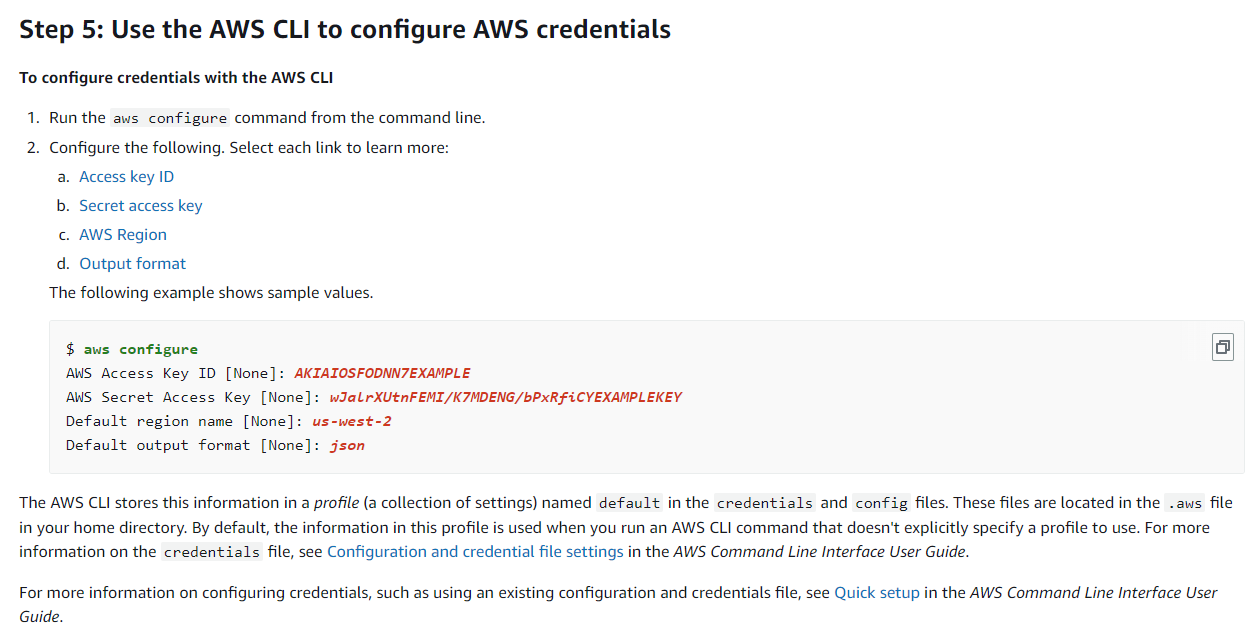
Ah, these were all found using that "Access Keys" link from the IAM user initial sign-in page where I found the SSO endpoint:
The "Access Keys" link has the private info right below this section (not pictured because... private.)
aws configure --profile sbonds-manning-2
I was prompted for the AWS access key ID and the AWS secret access key, but not the AWS session token. Presumably the aws configure sso process is taking care of the token renewal process. I guess I'll find out.
Final prerequisite time check: 2.75 hours
Installing the SAM CLI
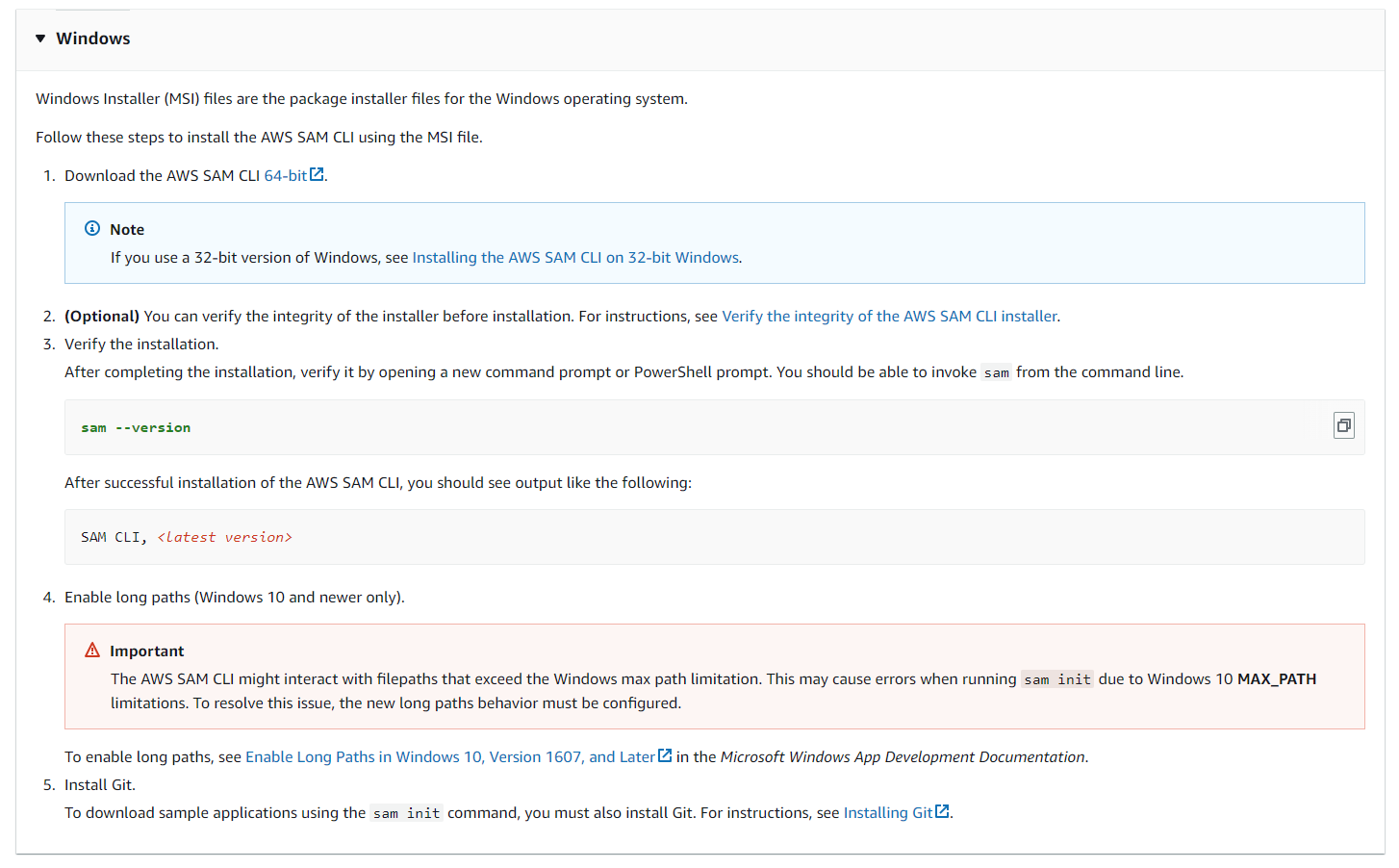
Verify integrity by confirming the thumbprint on the digital signature on the MSI file:
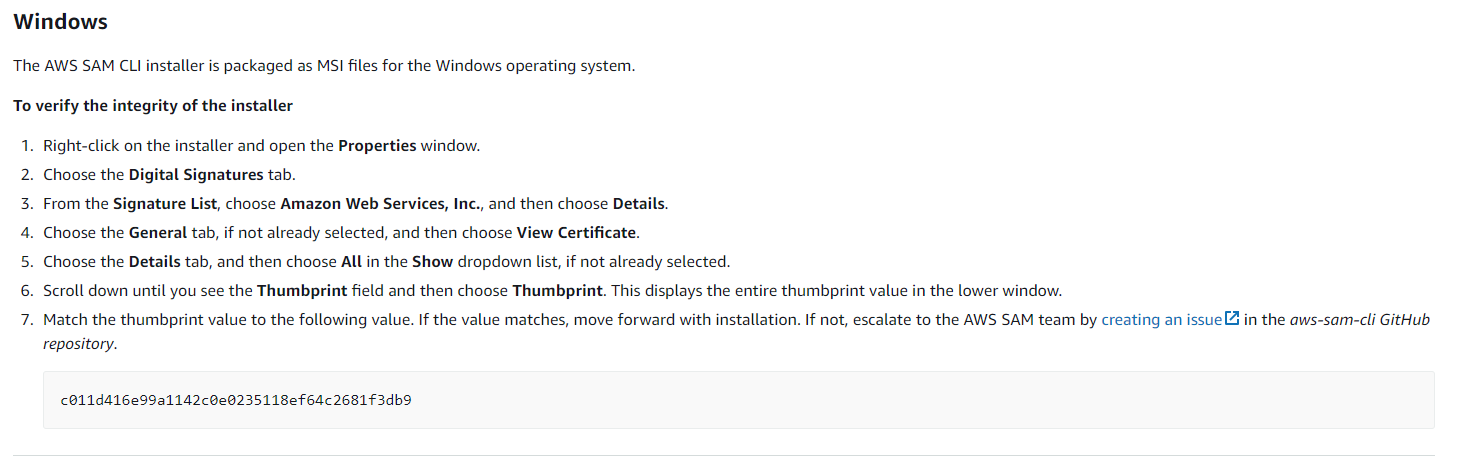
From my download:
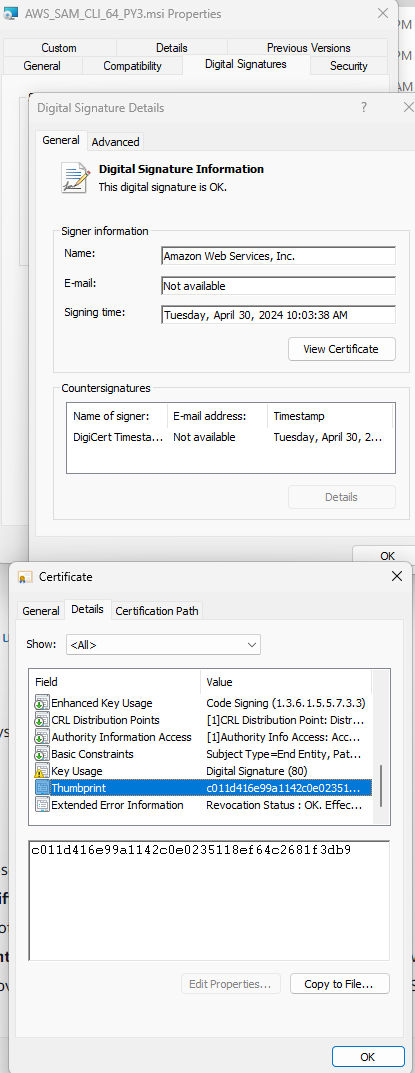
- ref: c011d416e99a1142c0e0235118ef64c2681f3db9
- mine: c011d416e99a1142c0e0235118ef64c2681f3db9
Looks like a match. I would be very surprised and concerned if they did not match.
I think they forgot to tell me to perform the actual installation step, but I'll go ahead and do that since verifying before it gets installed makes no sense. :-)
sam --version
Confirm long paths are already enabled:
Get-ItemProperty -Path "HKLM:\SYSTEM\CurrentControlSet\Control\FileSystem" -Name "LongPathsEnabled"
LongPathsEnabled : 1
PSPath           : Microsoft.PowerShell.Core\Registry::HKEY_LOCAL_MACHINE\SYSTEM\CurrentControlSet\Control\FileSystem
PSParentPath     : Microsoft.PowerShell.Core\Registry::HKEY_LOCAL_MACHINE\SYSTEM\CurrentControlSet\Control
PSChildName      : FileSystem
PSDrive          : HKLM
PSProvider       : Microsoft.PowerShell.Core\Registry
Git is already installed.
git --version
Final SAM install time check: 3.0 hours
After the initial "Get AWS working" hurdle, things seem to be moving nicely.
Let's see if that jinxes me.
Amazon Hello World serverless app
- Prerequisites
- Step 1: Initialize the sample Hello World application
- Step 2: Build your application
- Step 3: Deploy your application to the AWS Cloud
- Step 4: Run your application
- Step 5: Interact with your function in the AWS Cloud
- Step 6: Modify and sync your application to the AWS Cloud
- Step 7: (Optional) Test your application locally
- Step 8: Delete your application from the AWS Cloud
Prerequisites
Thankfully these were covered above with the AWS SAM setup, which took 6.75 hours and only two tries.
Step 1: Initialize the sample Hello World application
Make a directory for it:
cd $HOME/github/sbonds-event-driven-applications-lp
mkdir amazon-serverless-hello-world
cd amazon-serverless-hello-world
Run the init command from sam in a Windows Git bash shell:
At first, I thought I had neglected to start a new session to get the PATH changes after installation, but that was not the issue.
From PowerShell:
Name            : sam.cmd
CommandType     : Application
Definition      : C:\Program Files\Amazon\AWSSAMCLI\bin\sam.cmd
Extension       : .cmd
Path            : C:\Program Files\Amazon\AWSSAMCLI\bin\sam.cmd
FileVersionInfo : File:             C:\Program Files\Amazon\AWSSAMCLI\bin\sam.cmd
                  InternalName:
                  OriginalFilename:
                  FileVersion:
                  FileDescription:
                  Product:
                  ProductVersion:
                  Debug:            False
                  Patched:          False
                  PreRelease:       False
                  PrivateBuild:     False
                  SpecialBuild:     False
                  Language:
So bash doesn't recognize ".cmd" as executable, so I need to run "sam.cmd":
sam.cmd --version
sam.cmd init
Which template source would you like to use?
        1 - AWS Quick Start Templates
        2 - Custom Template Location
Choice: 1

Choose an AWS Quick Start application template
        1 - Hello World Example
        2 - Data processing
        3 - Hello World Example with Powertools for AWS Lambda
        4 - Multi-step workflow
        5 - Scheduled task
        6 - Standalone function
        7 - Serverless API
        8 - Infrastructure event management
        9 - Lambda Response Streaming
        10 - Serverless Connector Hello World Example
        11 - Multi-step workflow with Connectors
        12 - GraphQLApi Hello World Example
        13 - Full Stack
        14 - Lambda EFS example
        15 - DynamoDB Example
        16 - Machine Learning
Template: 1

Use the most popular runtime and package type? (Python and zip) [y/N]: y

Would you like to enable X-Ray tracing on the function(s) in your application?  [y/N]: n

Would you like to enable monitoring using CloudWatch Application Insights?
For more info, please view https://docs.aws.amazon.com/AmazonCloudWatch/latest/monitoring/cloudwatch-application-insights.html [y/N]: n

Would you like to set Structured Logging in JSON format on your Lambda functions?  [y/N]: n

Project name [sam-app]:

Cloning from https://github.com/aws/aws-sam-cli-app-templates (process may take a moment)


    -----------------------
    Generating application:
    -----------------------
    Name: sam-app
    Runtime: python3.9
    Architectures: x86_64
    Dependency Manager: pip
    Application Template: hello-world
    Output Directory: .
    Configuration file: sam-app\samconfig.toml

    Next steps can be found in the README file at sam-app\README.md


Commands you can use next
=========================
[*] Create pipeline: cd sam-app && sam pipeline init --bootstrap
[*] Validate SAM template: cd sam-app && sam validate
[*] Test Function in the Cloud: cd sam-app && sam sync --stack-name {stack-name} --watch
Step 2: Build your application
sam.cmd build
Fails looking for python 3.9 because I have python 3.10.
Install Docker Desktop
Set up Docker Desktop to run builds in a local container.
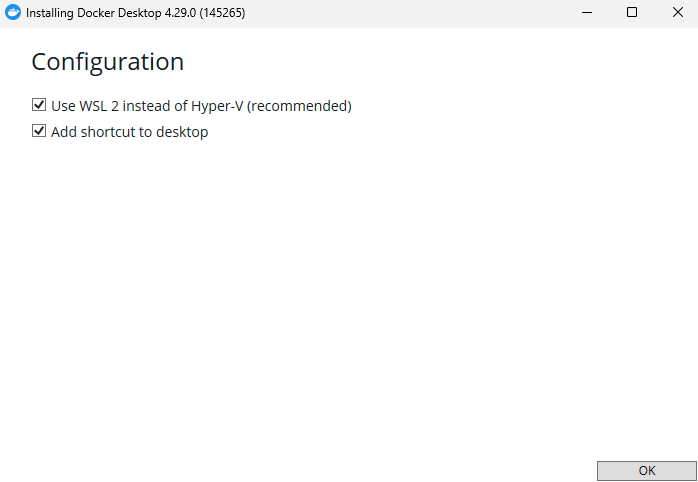
Brace for reboot!
Docker Desktop does not start on reboot.
Manual start gives:
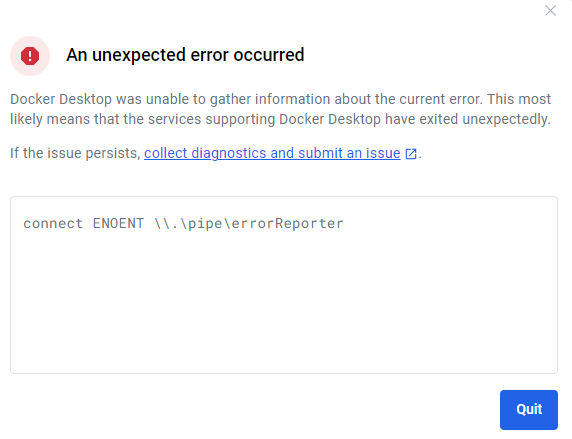
I dunno. I've used Docker Desktop enough to expect errors.
Run & "C:\Program Files\Docker\Docker\resources\com.docker.diagnose.exe" check from PowerShell to get more details.
1 : The test: does the bootloader have virtualization enabled?
    Failed with: open C:\Users\sbond\AppData\Roaming\Docker\settings.json: The system cannot find the file specified.

The Docker engine runs inside a Linux VM. Therefore Windows must boot with the Microsoft Hypervisor enabled.
Run:
 bcdedit /set hypervisorlaunchtype auto
I'm not going to mess up my bootloader, instead try uninstalling and reinstalling with Hyper-V instead of WSL.
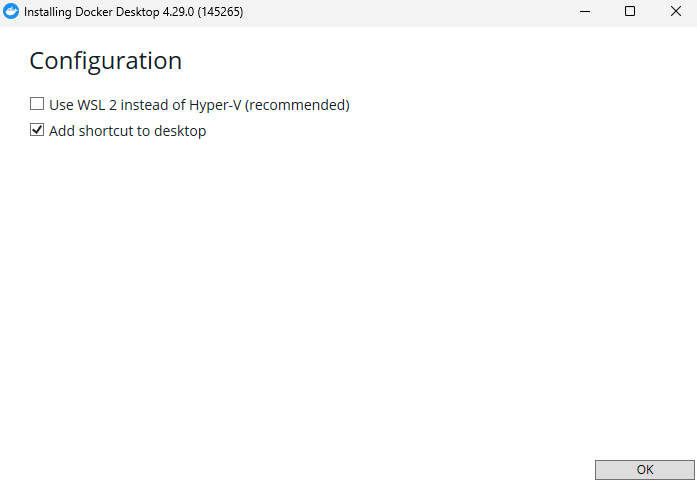
Reboot again.
Same error. Used (as administrator):
bcdedit /set hypervisorlaunchtype auto
Reboot again.
Same error.
Check https://docs.docker.com/desktop/troubleshoot/topics/#virtualization
Windows Features:
- Hyper-V is enabled
- Virtual Machine Platform is enabled
- Windows Subsystem for Linux is enabled.
Check docker-users group: my ID was missing. Added it.
No change.
Abandon Docker: Elapsed time today: 5 hours
It seems like it would be easier to install Python 3.9 at this point, or change the sample app to use Python 3.10. If "hello world" breaks on a minor python version change, there's something pretty wrong somewhere.
Try build with Python 3.10
Changged amazon-serverless-hello-world/template.yaml to use python 3.10 as the runtime.
Gives:
Error: Template file not found at C:\Users\sbond\github.com\sbonds-event-driven-applications-lp\amazon-serverless-hello-world\template.yml
Hmm... I thought I was in this same directory before, maybe "sam init" changed my directory and I didn't notice.
cd $HOME/github/sbonds-event-driven-applications-lp/amazon-serverless-hello-world/sam-app
sam.cmd build
Works much better:
Starting Build use cache
Manifest file is changed (new hash: 3298f13049d19cffaa37ca931dd4d421) or dependency folder (.aws-sam\deps\490db71d-46db-46ac-a216-5a23f07c05aa) is missing for (HelloWorldFunction), downloading dependencies and copying/building source
Building codeuri: C:\Users\sbond\github.com\sbonds-event-driven-applications-lp\amazon-serverless-hello-world\sam-app\hello_world runtime: python3.10 metadata: {} architecture: x86_64 functions: HelloWorldFunction
 Running PythonPipBuilder:CleanUp
 Running PythonPipBuilder:ResolveDependencies
 Running PythonPipBuilder:CopySource
 Running PythonPipBuilder:CopySource

Build Succeeded

Built Artifacts  : .aws-sam\build
Built Template   : .aws-sam\build\template.yaml

Commands you can use next
=========================
[*] Validate SAM template: sam validate
[*] Invoke Function: sam local invoke
[*] Test Function in the Cloud: sam sync --stack-name {{stack-name}} --watch
[*] Deploy: sam deploy --guided
Step 3: Deploy your application to the AWS Cloud
sam.cmd deploy --guided
Use this config:
- Stack Name:
sam-hello-world - AWS Region:
us-west-2
Configuring SAM deploy
======================

        Looking for config file [samconfig.toml] :  Found
        Reading default arguments  :  Success

        Setting default arguments for 'sam deploy'
        =========================================
        Stack Name [sam-app]: sam-hello-world
        AWS Region [us-east-1]: us-west-2
        #Shows you resources changes to be deployed and require a 'Y' to initiate deploy
        Confirm changes before deploy [Y/n]: Y
        #SAM needs permission to be able to create roles to connect to the resources in your template
        Allow SAM CLI IAM role creation [Y/n]: Y
        #Preserves the state of previously provisioned resources when an operation fails
        Disable rollback [y/N]: N
        HelloWorldFunction has no authentication. Is this okay? [y/N]: Y
        Save arguments to configuration file [Y/n]: Y
        SAM configuration file [samconfig.toml]:
        SAM configuration environment [default]:

        Looking for resources needed for deployment:
Error: Unable to locate credentials
I wonder if that "configuration environment" is the same thing as an AWS CLI profile? Try again using sbonds-manning-2.
No change:
Configuring SAM deploy
======================

        Looking for config file [samconfig.toml] :  Found
        Reading default arguments  :  Success

        Setting default arguments for 'sam deploy'
        =========================================
        Stack Name [sam-app]: sam-hello-world
        AWS Region [us-east-1]: us-west-2
        #Shows you resources changes to be deployed and require a 'Y' to initiate deploy
        Confirm changes before deploy [Y/n]: Y
        #SAM needs permission to be able to create roles to connect to the resources in your template
        Allow SAM CLI IAM role creation [Y/n]: Y
        #Preserves the state of previously provisioned resources when an operation fails
        Disable rollback [y/N]: N
        HelloWorldFunction has no authentication. Is this okay? [y/N]: Y
        Save arguments to configuration file [Y/n]: Y
        SAM configuration file [samconfig.toml]:
        SAM configuration environment [default]: sbonds-manning-2

        Looking for resources needed for deployment:
Error: Unable to locate credentials
From SAM troubleshooting:
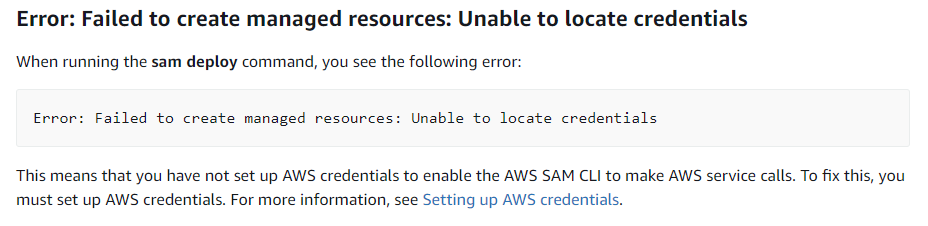
This refers me back to the SAM prerequisites which I completed earlier, which is not especially helpful.
How can I check that AWS is working?
StackExchange: How to test credentials for AWS Command Line Tools
aws sts get-caller-identity
Excellent! Making progress.
aws sts get-caller-identity --profile sbonds-manning-2
I guess the Amazon SSO isn't working so well.
Based on this discussion it looks like I need to run an AWS command at least once during the refresh interval (12 hours) in order for the SSO session to remain active. I can start a new session using aws sso login command.
Open an Incognito session with my IAM admin user.
aws sso login --profile sbonds-manning-2 --no-browser
Try the get-caller-identify again:
aws sts get-caller-identity --profile sbonds-manning-2
{
    "UserId": "AR-REDACTED:sbonds_adm",
    "Account": "992382435361",
    "Arn": "arn:aws:sts::992382435361:assumed-role/AWSReservedSSO_AdministratorAccess_REDACTED/sbonds_adm"
}
Try the sam deployment again:
sam.cmd deploy --guided
Configuring SAM deploy
======================

        Looking for config file [samconfig.toml] :  Found
        Reading default arguments  :  Success

        Setting default arguments for 'sam deploy'
        =========================================
        Stack Name [sam-app]: sam-hello-world
        AWS Region [us-east-1]: us-west-2
        #Shows you resources changes to be deployed and require a 'Y' to initiate deploy
        Confirm changes before deploy [Y/n]: Y
        #SAM needs permission to be able to create roles to connect to the resources in your template
        Allow SAM CLI IAM role creation [Y/n]: Y
        #Preserves the state of previously provisioned resources when an operation fails
        Disable rollback [y/N]: N
        HelloWorldFunction has no authentication. Is this okay? [y/N]: Y
        Save arguments to configuration file [Y/n]: Y
        SAM configuration file [samconfig.toml]:
        SAM configuration environment [default]: sbonds-manning-2

        Looking for resources needed for deployment:
Error: Unable to locate credentials
Well, that seems familiar. Thanks for that. See what SAM options might help-- probably related to my AWS profile.
sam.cmd deploy --help
AWS Credential Options:

    --region TEXT                          Set the AWS Region of the service.
                                           (e.g. us-east-1)

    --profile TEXT                         Select a specific profile from your
                                           credential file to get AWS
                                           credentials.
Well, that seems promising.
sam.cmd deploy --region us-east-2 --profile sbonds-manning-2 --guided
Works much better!
Configuring SAM deploy
======================

        Looking for config file [samconfig.toml] :  Found
        Reading default arguments  :  Success

        Setting default arguments for 'sam deploy'
        =========================================
        Stack Name [sam-app]: sam-hello-world
        AWS Region [us-east-2]: us-west-2
        #Shows you resources changes to be deployed and require a 'Y' to initiate deploy
        Confirm changes before deploy [Y/n]: Y
        #SAM needs permission to be able to create roles to connect to the resources in your template
        Allow SAM CLI IAM role creation [Y/n]: Y
        #Preserves the state of previously provisioned resources when an operation fails
        Disable rollback [y/N]: N
        HelloWorldFunction has no authentication. Is this okay? [y/N]: Y
        Save arguments to configuration file [Y/n]: Y
        SAM configuration file [samconfig.toml]:
        SAM configuration environment [default]:

        Looking for resources needed for deployment:
        Creating the required resources...
        Successfully created!

        Managed S3 bucket: aws-sam-cli-managed-default-samclisourcebucket-x56mdwirqovy
        A different default S3 bucket can be set in samconfig.toml and auto resolution of buckets turned off by setting resolve_s3=False

        Saved arguments to config file
        Running 'sam deploy' for future deployments will use the parameters saved above.
        The above parameters can be changed by modifying samconfig.toml
        Learn more about samconfig.toml syntax at
        https://docs.aws.amazon.com/serverless-application-model/latest/developerguide/serverless-sam-cli-config.html

        Uploading to sam-hello-world/6f1f70916ba79a761616ac6069937996  556557 / 556557  (100.00%)

        Deploying with following values
        ===============================
        Stack name                   : sam-hello-world
        Region                       : us-west-2
        Confirm changeset            : True
        Disable rollback             : False
        Deployment s3 bucket         : aws-sam-cli-managed-default-samclisourcebucket-x56mdwirqovy
        Capabilities                 : ["CAPABILITY_IAM"]
        Parameter overrides          : {}
        Signing Profiles             : {}

Initiating deployment
=====================

        Uploading to sam-hello-world/9ca5ebd96de254a5dca65932415a1f10.template  1253 / 1253  (100.00%)


Waiting for changeset to be created..

CloudFormation stack changeset
-------------------------------------------------------------------------------------------------
Operation                LogicalResourceId        ResourceType             Replacement
-------------------------------------------------------------------------------------------------
+ Add                    HelloWorldFunctionHell   AWS::Lambda::Permissio   N/A
                         oWorldPermissionProd     n
+ Add                    HelloWorldFunctionRole   AWS::IAM::Role           N/A
+ Add                    HelloWorldFunction       AWS::Lambda::Function    N/A
+ Add                    ServerlessRestApiDeplo   AWS::ApiGateway::Deplo   N/A
                         yment47fc2d5f9d          yment
+ Add                    ServerlessRestApiProdS   AWS::ApiGateway::Stage   N/A
                         tage
+ Add                    ServerlessRestApi        AWS::ApiGateway::RestA   N/A
                                                  pi
-------------------------------------------------------------------------------------------------


Changeset created successfully. arn:aws:cloudformation:us-west-2:992382435361:changeSet/samcli-deploy1714836587/b791d9f1-5e5c-426d-84be-d5b7fab654a1


Previewing CloudFormation changeset before deployment
======================================================
After confirming:
2024-05-04 08:31:15 - Waiting for stack create/update to complete

CloudFormation events from stack operations (refresh every 5.0 seconds)
-------------------------------------------------------------------------------------------------
ResourceStatus           ResourceType             LogicalResourceId        ResourceStatusReason
-------------------------------------------------------------------------------------------------
CREATE_IN_PROGRESS       AWS::CloudFormation::S   sam-hello-world          User Initiated
                         tack
CREATE_IN_PROGRESS       AWS::IAM::Role           HelloWorldFunctionRole   -
CREATE_IN_PROGRESS       AWS::IAM::Role           HelloWorldFunctionRole   Resource creation
                                                                           Initiated
CREATE_COMPLETE          AWS::IAM::Role           HelloWorldFunctionRole   -
CREATE_IN_PROGRESS       AWS::Lambda::Function    HelloWorldFunction       -
CREATE_IN_PROGRESS       AWS::Lambda::Function    HelloWorldFunction       Resource creation
                                                                           Initiated
CREATE_IN_PROGRESS       AWS::Lambda::Function    HelloWorldFunction       Eventual consistency
                                                                           check initiated
CREATE_IN_PROGRESS       AWS::ApiGateway::RestA   ServerlessRestApi        -
                         pi
CREATE_IN_PROGRESS       AWS::ApiGateway::RestA   ServerlessRestApi        Resource creation
                         pi                                                Initiated
CREATE_COMPLETE          AWS::ApiGateway::RestA   ServerlessRestApi        -
                         pi
CREATE_IN_PROGRESS       AWS::ApiGateway::Deplo   ServerlessRestApiDeplo   -
                         yment                    yment47fc2d5f9d
CREATE_IN_PROGRESS       AWS::Lambda::Permissio   HelloWorldFunctionHell   -
                         n                        oWorldPermissionProd
CREATE_IN_PROGRESS       AWS::Lambda::Permissio   HelloWorldFunctionHell   Resource creation
                         n                        oWorldPermissionProd     Initiated
CREATE_COMPLETE          AWS::Lambda::Permissio   HelloWorldFunctionHell   -
                         n                        oWorldPermissionProd
CREATE_IN_PROGRESS       AWS::ApiGateway::Deplo   ServerlessRestApiDeplo   Resource creation
                         yment                    yment47fc2d5f9d          Initiated
CREATE_COMPLETE          AWS::ApiGateway::Deplo   ServerlessRestApiDeplo   -
                         yment                    yment47fc2d5f9d
CREATE_COMPLETE          AWS::Lambda::Function    HelloWorldFunction       -
CREATE_IN_PROGRESS       AWS::ApiGateway::Stage   ServerlessRestApiProdS   -
                                                  tage
CREATE_IN_PROGRESS       AWS::ApiGateway::Stage   ServerlessRestApiProdS   Resource creation
                                                  tage                     Initiated
CREATE_COMPLETE          AWS::ApiGateway::Stage   ServerlessRestApiProdS   -
                                                  tage
CREATE_COMPLETE          AWS::CloudFormation::S   sam-hello-world          -
                         tack
-------------------------------------------------------------------------------------------------

CloudFormation outputs from deployed stack
-------------------------------------------------------------------------------------------------
Outputs
-------------------------------------------------------------------------------------------------
Key                 HelloWorldFunctionIamRole
Description         Implicit IAM Role created for Hello World function
Value               arn:aws:iam::992382435361:role/sam-hello-world-HelloWorldFunctionRole-
ZSHbI3G9ZZwu

Key                 HelloWorldApi
Description         API Gateway endpoint URL for Prod stage for Hello World function
Value               https://qrg4awg0wb.execute-api.us-west-2.amazonaws.com/Prod/hello/

Key                 HelloWorldFunction
Description         Hello World Lambda Function ARN
Value               arn:aws:lambda:us-west-2:992382435361:function:sam-hello-world-
HelloWorldFunction-fUCly1zfOx9E
-------------------------------------------------------------------------------------------------


Successfully created/updated stack - sam-hello-world in us-west-2
Add "sam-app/.aws-sam" to .gitignore
Time elapsed today since "Try build with Python 3.10": 0.75h.
Step 4: Run your application
Check my endpoints even though I can see them in the output above, just to exercise that process:
sam.cmd list endpoints --region us-east-2 --profile sbonds-manning-2 --output json
I sure seem to learn a lot by not using default values.
sam.cmd list endpoints --region us-east-2 --profile sbonds-manning-2 --output json --stack-name sam-hello-world
I thought that was my AWS auth region, I guess not.
sam.cmd list endpoints --region us-west-2 --profile sbonds-manning-2 --output json --stack-name sam-hello-world
There we go, all the little config bits are now aligned:
[
  {
    "LogicalResourceId": "HelloWorldFunction",
    "PhysicalResourceId": "sam-hello-world-HelloWorldFunction-fUCly1zfOx9E",
    "CloudEndpoint": "-",
    "Methods": "-"
  },
  {
    "LogicalResourceId": "ServerlessRestApi",
    "PhysicalResourceId": "qrg4awg0wb",
    "CloudEndpoint": [
      "https://qrg4awg0wb.execute-api.us-west-2.amazonaws.com/Prod",
      "https://qrg4awg0wb.execute-api.us-west-2.amazonaws.com/Stage"
    ],
    "Methods": [
      "/hello['get']"
    ]
  }
]
curl --silent https://qrg4awg0wb.execute-api.us-west-2.amazonaws.com/Prod/hello/
Yay!
Elapsed time since "Try build with Python 3.10": 1.0 hours
Step 5: Interact with your function in the AWS Cloud
sam.cmd remote invoke HelloWorldFunction --profile sbonds-manning-2 --stack-name sam-hello-world
Invoking Lambda Function HelloWorldFunction
START RequestId: 37601cdc-4b72-40b2-be3e-8b6e96ee0221 Version: $LATEST
END RequestId: 37601cdc-4b72-40b2-be3e-8b6e96ee0221
REPORT RequestId: 37601cdc-4b72-40b2-be3e-8b6e96ee0221  Duration: 1.02 ms       Billed Duration: 2 ms   Memory Size: 128 MB     Max Memory Used: 31 MB
{"statusCode": 200, "body": "{\"message\": \"hello world\"}"}
Elapsed time since "Try build with Python 3.10": 1.0 hours
Step 6: Modify and sync your application to the AWS Cloud
Be sure I'm in the app directory:
cd $HOME/github/sbonds-event-driven-applications-lp/amazon-serverless-hello-world/sam-appsam.cmd sync --profile sbonds-manning-2 --watch
(NOTE FROM THE FUTURE: I should have specified --stack-name above)
The SAM CLI will use the AWS Lambda, Amazon API Gateway, and AWS StepFunctions APIs to upload your code without
performing a CloudFormation deployment. This will cause drift in your CloudFormation stack.
**The sync command should only be used against a development stack**.

Confirm that you are synchronizing a development stack.

Enter Y to proceed with the command, or enter N to cancel:
 [Y/n]: Y
Queued infra sync. Waiting for in progress code syncs to complete...
Starting infra sync.
Manifest is not changed for (HelloWorldFunction), running incremental build
Building codeuri: C:\Users\sbond\github.com\sbonds-event-driven-applications-lp\amazon-serverless-hello-world\sam-app\hello_world runtime: python3.10 metadata: {} architecture: x86_64 functions: HelloWorldFunction
 Running PythonPipBuilder:CopySource

Build Succeeded

Successfully packaged artifacts and wrote output template to file C:\Users\sbond\AppData\Local\Temp\tmp18gj7o83.
Execute the following command to deploy the packaged template
sam deploy --template-file C:\Users\sbond\AppData\Local\Temp\tmp18gj7o83 --stack-name <YOUR STACK NAME>


        Deploying with following values
        ===============================
        Stack name                   : sam-app
        Region                       : us-west-2
        Disable rollback             : False
        Deployment s3 bucket         : aws-sam-cli-managed-default-samclisourcebucket-x56mdwirqovy
        Capabilities                 : ["CAPABILITY_NAMED_IAM", "CAPABILITY_AUTO_EXPAND"]
        Parameter overrides          : {}
        Signing Profiles             : null

Initiating deployment
=====================


2024-05-04 08:52:52 - Waiting for stack create/update to complete

CloudFormation events from stack operations (refresh every 0.5 seconds)
-------------------------------------------------------------------------------------------------
ResourceStatus           ResourceType             LogicalResourceId        ResourceStatusReason
-------------------------------------------------------------------------------------------------
CREATE_IN_PROGRESS       AWS::CloudFormation::S   sam-app                  User Initiated
                         tack
CREATE_IN_PROGRESS       AWS::CloudFormation::S   sam-app                  Transformation
                         tack                                              succeeded
CREATE_IN_PROGRESS       AWS::CloudFormation::S   AwsSamAutoDependencyLa   -
                         tack                     yerNestedStack
CREATE_IN_PROGRESS       AWS::IAM::Role           HelloWorldFunctionRole   -
CREATE_IN_PROGRESS       AWS::CloudFormation::S   AwsSamAutoDependencyLa   Resource creation
                         tack                     yerNestedStack           Initiated
CREATE_IN_PROGRESS       AWS::IAM::Role           HelloWorldFunctionRole   Resource creation
                                                                           Initiated
(Pause)
CREATE_COMPLETE          AWS::IAM::Role           HelloWorldFunctionRole   -
CREATE_COMPLETE          AWS::CloudFormation::S   AwsSamAutoDependencyLa   -
                         tack                     yerNestedStack
CREATE_IN_PROGRESS       AWS::Lambda::Function    HelloWorldFunction       -
CREATE_IN_PROGRESS       AWS::Lambda::Function    HelloWorldFunction       Resource creation
                                                                           Initiated
CREATE_IN_PROGRESS       AWS::Lambda::Function    HelloWorldFunction       Eventual consistency
                                                                           check initiated
CREATE_IN_PROGRESS       AWS::ApiGateway::RestA   ServerlessRestApi        -
                         pi
CREATE_IN_PROGRESS       AWS::ApiGateway::RestA   ServerlessRestApi        Resource creation
                         pi                                                Initiated
CREATE_COMPLETE          AWS::ApiGateway::RestA   ServerlessRestApi        -
                         pi
CREATE_IN_PROGRESS       AWS::ApiGateway::Deplo   ServerlessRestApiDeplo   -
                         yment                    yment47fc2d5f9d
CREATE_IN_PROGRESS       AWS::Lambda::Permissio   HelloWorldFunctionHell   -
                         n                        oWorldPermissionProd
CREATE_IN_PROGRESS       AWS::Lambda::Permissio   HelloWorldFunctionHell   Resource creation
                         n                        oWorldPermissionProd     Initiated
CREATE_IN_PROGRESS       AWS::ApiGateway::Deplo   ServerlessRestApiDeplo   Resource creation
                         yment                    yment47fc2d5f9d          Initiated
CREATE_COMPLETE          AWS::Lambda::Permissio   HelloWorldFunctionHell   -
                         n                        oWorldPermissionProd
CREATE_COMPLETE          AWS::ApiGateway::Deplo   ServerlessRestApiDeplo   -
                         yment                    yment47fc2d5f9d
CREATE_COMPLETE          AWS::Lambda::Function    HelloWorldFunction       -
CREATE_IN_PROGRESS       AWS::ApiGateway::Stage   ServerlessRestApiProdS   -
                                                  tage
CREATE_IN_PROGRESS       AWS::ApiGateway::Stage   ServerlessRestApiProdS   Resource creation
                                                  tage                     Initiated
CREATE_COMPLETE          AWS::ApiGateway::Stage   ServerlessRestApiProdS   -
                                                  tage
CREATE_COMPLETE          AWS::CloudFormation::S   sam-app                  -
                         tack
-------------------------------------------------------------------------------------------------

CloudFormation outputs from deployed stack
-------------------------------------------------------------------------------------------------
Outputs
-------------------------------------------------------------------------------------------------
Key                 HelloWorldFunctionIamRole
Description         Implicit IAM Role created for Hello World function
Value               arn:aws:iam::992382435361:role/sam-app-HelloWorldFunctionRole-4qUZbBCasXTk

Key                 HelloWorldApi
Description         API Gateway endpoint URL for Prod stage for Hello World function
Value               https://ilj7jawidk.execute-api.us-west-2.amazonaws.com/Prod/hello/

Key                 HelloWorldFunction
Description         Hello World Lambda Function ARN
Value               arn:aws:lambda:us-west-2:992382435361:function:sam-app-HelloWorldFunction-
rzbzgt6FNicg
-------------------------------------------------------------------------------------------------


Stack creation succeeded. Sync infra completed.

CodeTrigger not created as CodeUri or DefinitionUri is missing for ServerlessRestApi.
Infra sync completed.
Changed sam-app/hello_world/app.py. Sync screen shows:
Syncing Lambda Function HelloWorldFunction...
Manifest is not changed for (HelloWorldFunction), running incremental build
Building codeuri: C:\Users\sbond\github.com\sbonds-event-driven-applications-lp\amazon-serverless-hello-world\sam-app\hello_world runtime: python3.10 metadata: {} architecture: x86_64 functions: HelloWorldFunction
 Running PythonPipBuilder:CopySource
04/May/2024:08:54:26: Finished syncing Lambda Function HelloWorldFunction.
curl --silent https://qrg4awg0wb.execute-api.us-west-2.amazonaws.com/Prod/hello/
No change. Looks like the sync created a new endpoint URL, which is a bit unexpected.
curl --silent https://ilj7jawidk.execute-api.us-west-2.amazonaws.com/Prod/hello/
So the sync created a new app?
        Deploying with following values
        ===============================
        Stack name                   : sam-app
        Region                       : us-west-2
        Disable rollback             : False
Yes, because I neglected to name the stack my non-default name in the sync command it created a new one.
Elapsed time since "Try build with Python 3.10": 1.25 hours
Step 7: (Optional) Test your application locally
Can't do this since Docker didn't work within a reasonable amount of time.
Step 8: Delete your application from the AWS Cloud
sam.cmd delete --profile sbonds-manning-2
I expected this to delete the default "sam-app" but it did not. Maybe that one went away when the sync stopped?
        Are you sure you want to delete the stack sam-hello-world in the region us-west-2 ? [y/N]: y
        Are you sure you want to delete the folder sam-hello-world in S3 which contains the artifacts? [y/N]: y
        - Deleting S3 object with key sam-hello-world/6f1f70916ba79a761616ac6069937996
        - Deleting S3 object with key sam-hello-world/9ca5ebd96de254a5dca65932415a1f10.template
        - Deleting Cloudformation stack sam-hello-world

Deleted successfully
Check the root user AWS console for any resources hanging around.
One small S3 bucket "aws-sam-cli-managed-default-samclisourcebucket-REDACTED" still exists. I also see a CloudFormation stack named "sam-app" still present from the sync.
sam.cmd delete --profile sbonds-manning-2 --stack-name sam-app
        Are you sure you want to delete the stack sam-app in the region us-west-2 ? [y/N]: y
        Do you want to delete the template file 34cb6d9c4a6cc55261ee96bf96485678.template in S3? [y/N]: y
        - Deleting S3 object with key 1657479c89d91742e08d668fed4143d2
        - Deleting S3 object with key f94a278d3957e3e943f5b8830f3a919f.template
        - Deleting S3 object with key 34cb6d9c4a6cc55261ee96bf96485678.template
        - Deleting Cloudformation stack sam-app
I guess what counts as "default" for the sync command is different for other commands. Shows the value in explicitly declaring what you need instead of relying on consistent defaults.
The "sam-app" CloudFormation stack shows absent in the root AWS user console now.
Setup complete
Total elapsed all in so far: 10.25 hours.